


Now this sounds interesting but I only understand half of it. Could you elaborate or point me in the right direction to learn about batch files and how to implement this exactly?I don't see why you can't accomplish this with a batch file. Create a batch file in notepad and then have your steam deck run the file to do all of the copying and renaming(if needed). Create a scene to load file2.
You are using an out of date browser. It may not display this or other websites correctly.
You should upgrade or use an alternative browser.
You should upgrade or use an alternative browser.
Hey there,I don't see why you can't accomplish this with a batch file. Create a batch file in notepad and then have your steam deck run the file to do all of the copying and renaming(if needed). Create a scene to load file2.
thanks for taking the time to reply, I did figure out how to set up a batch file that moves the latest file from my replay folder to a new folder. This way I have the regular replays saved to a different directory than my instant replay files.
Thanks again!
Con la ultima actualizacion de obs 29.1 beta 1 ya no es compatible , espero la actualizacion , muchas gracias por este pluginExeldro envió un nuevo recurso:
[sin formato]Fuente de reproducción[/sin formato] - [sin formato](cámara lenta) reproduce fuentes asíncronas desde la memoria[/sin formato]
Leer más sobre este recurso...
Canopus_Cat
New Member
Is there a way to make it load a file without reloading it each time you start OBS? I'm using it to play a media file forward and reverse for a scene transition ^^


lcalder
Member
It produces this error:@lcalder It seems to work fine for me. Do you get an error? Is it showing in your OBS log file?
LoadLibrary failed for '../../obs-plugins/64bit/replay-source.dll': The specified module could not be found.
13:01:40.954: (126)
13:01:40.954: Module '../../obs-plugins/64bit/replay-source.dll' not loaded
I will include the entire log file below.
This was working fine on OBS 29 version prior.
Interestingly, there is another plugin (droidcam) which also stopped working upon upgrading and shows a similar error of not being able to find the plugin and the developer said his works just as happens with you... So maybe something more structural was changed in obs for this beta. I tried removing all plugins and reinstalling the beta version and the plugins but still it doesn't find it.
All my other plugins work (except streamfx..)
Attachments
As far as I know, there is no solution for this problem yet.Does anyone got fixed this green overlay problem in saved files? View attachment 92952
I got this green files around 1-2 years ago, A fresh install of everything fixed it. Today they are not green.As far as I know, there is no solution for this problem yet.
Maybe something wrong between OBS and one or more plugins. Maybe the ffmpeg.
Jesper
I have this issue since day one. Different computers, new installs, new OBS and Plugin versions but the same result.I got this green files around 1-2 years ago, A fresh install of everything fixed it. Today they are not green.
Maybe something wrong between OBS and one or more plugins. Maybe the ffmpeg.
Jesper
I
Hola Exedro, reinstalé el plugin de cero e igualmente no me funcina en obs 29 beta@lcalder Parece funcionar bien para mí. ¿Le da un error? ¿Se muestra en su archivo de registro OBS?
lcalder
Member
Still doesn't load in Obs 29 beta 3... I tried reinstalling again but no go.It produces this error:
LoadLibrary failed for '../../obs-plugins/64bit/replay-source.dll': The specified module could not be found.
13:01:40.954: (126)
13:01:40.954: Module '../../obs-plugins/64bit/replay-source.dll' not loaded
I will include the entire log file below.
This was working fine on OBS 29 version prior.
Interestingly, there is another plugin (droidcam) which also stopped working upon upgrading and shows a similar error of not being able to find the plugin and the developer said his works just as happens with you... So maybe something more structural was changed in obs for this beta. I tried removing all plugins and reinstalling the beta version and the plugins but still it doesn't find it.
All my other plugins work (except streamfx..)
Here's a copy of the latest log in case it helps...
Attachments
Hi Guys,
I'm a pretty new OBS user, and I am trying to set-up the Replay Plug-in.
It worked when I set-it up from the start but ever since restarting OBS it no longer takes newly generated Replays. It keeps playing the first replay buffer. Is there a solution for this problem? At tools I have the script and the media source correct. Please let me know!

Settings from the replay source.

Settings Recording + Buffer
If I'm looking in the wrong direction let me know!
I'm a pretty new OBS user, and I am trying to set-up the Replay Plug-in.
It worked when I set-it up from the start but ever since restarting OBS it no longer takes newly generated Replays. It keeps playing the first replay buffer. Is there a solution for this problem? At tools I have the script and the media source correct. Please let me know!
Settings from the replay source.
Settings Recording + Buffer
If I'm looking in the wrong direction let me know!
LukeSaward
New Member
Hi Guys,
I'm a pretty new OBS user, and I am trying to set-up the Replay Plug-in.
It worked when I set-it up from the start but ever since restarting OBS it no longer takes newly generated Replays. It keeps playing the first replay buffer. Is there a solution for this problem? At tools I have the script and the media source correct. Please let me know!
View attachment 93075
Settings from the replay source.
View attachment 93076
Settings Recording + Buffer
If I'm looking in the wrong direction let me know!
That is not how you set it up.
You need to add a Replay Source to your scene and configure it from there.
It looks like this for me:
You can set a directory with the Browse button.
Hello Exeldro,
there is a new strange behavior with your Plugin.
When im using a USB Device Camera, and start via hotkey the replay with 7500 ms length, (7 sec), the output file is 14 sec long and in slow motion.
When im using 2 cameras, it will double the lenght to 21 sec and the speed is more slowed down.
Im using OBS 29.2 and the latest version of replay source.
Im using Win 11 as OS.
When im using DroidCam via Wifi or LAN, there is no strange behavior, but connected via USB the same as above.
What im doing wrong or is it a BUG oder misconfiguration?
Greetings
Gernot
there is a new strange behavior with your Plugin.
When im using a USB Device Camera, and start via hotkey the replay with 7500 ms length, (7 sec), the output file is 14 sec long and in slow motion.
When im using 2 cameras, it will double the lenght to 21 sec and the speed is more slowed down.
Im using OBS 29.2 and the latest version of replay source.
Im using Win 11 as OS.
When im using DroidCam via Wifi or LAN, there is no strange behavior, but connected via USB the same as above.
What im doing wrong or is it a BUG oder misconfiguration?
Greetings
Gernot
Attachments
-
 2023-04-13 17_28_48-OBS 29.0.2 (64-bit, windows) - Profil_ Matte 7 - Standard - 3000 KBS - Sze...png20.9 KB · Views: 104
 -
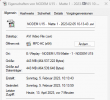 2023-04-13 17_30_07-Eigenschaften von NODEM U15 - Matte 1 - 2023-02-05 10-13-43 .avi.png16.6 KB · Views: 117
 -
 2023-04-13 17_31_06-OBS 29.0.2 (64-bit, windows) - Profil_ Matte 7 - Standard - 3000 KBS - Sze...png18.9 KB · Views: 116

